Case Study · B2B SaaS · Operational Execution
Turning tribal knowledge into a runnable operating system
Designing Guidant Run from early prototype into a secure, multi-role execution platform with versioned SOPs, mobile capture, and AI-assisted authoring.
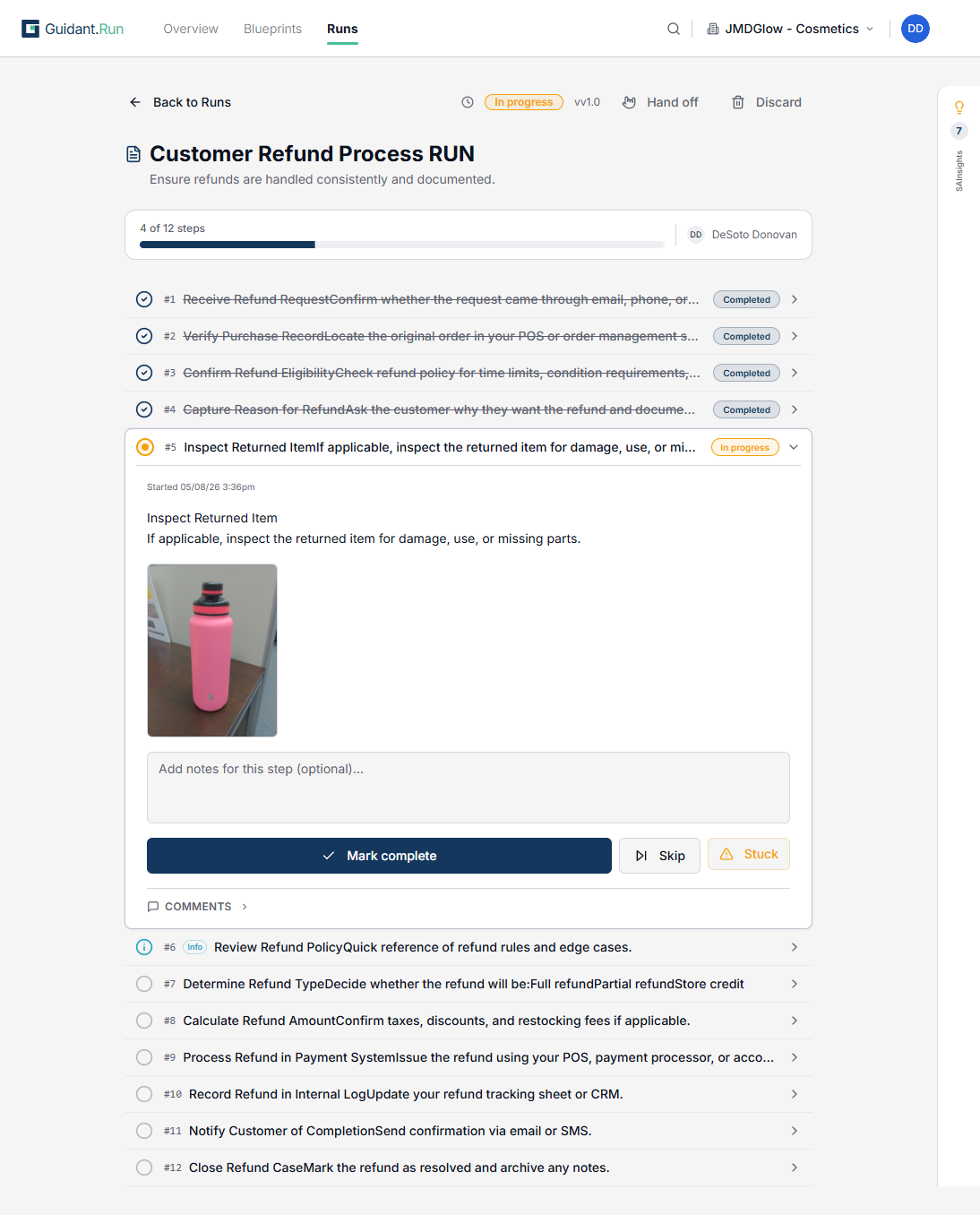
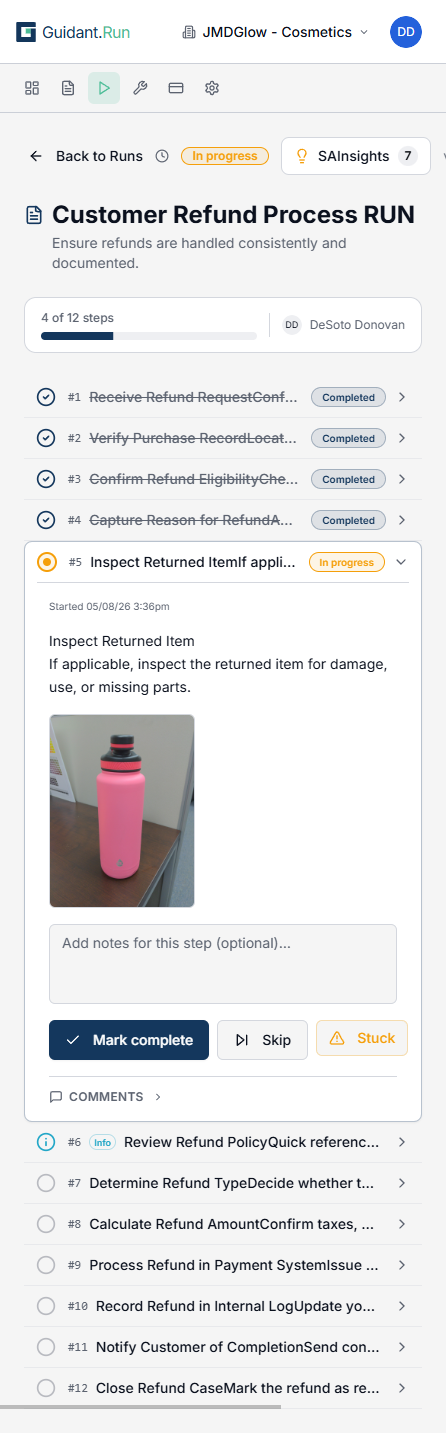
The business problem
Operational knowledge at most companies lives in three broken places: people's heads, stale documents, and Slack threads no one can find. When the person who "knows how we do it" is out or quits, work either stops or goes wrong.
Existing tools split the world into docs (Notion, Confluence) and tasks (Asana, ClickUp), so almost nothing lets teams define a single artifact that both describes the process and powers day-to-day execution - with every run feeding back into improving the blueprint.
Guidant Run was built to close that gap: turn tribal knowledge into a system teams actually run on, not a wiki they ignore.
Users and roles
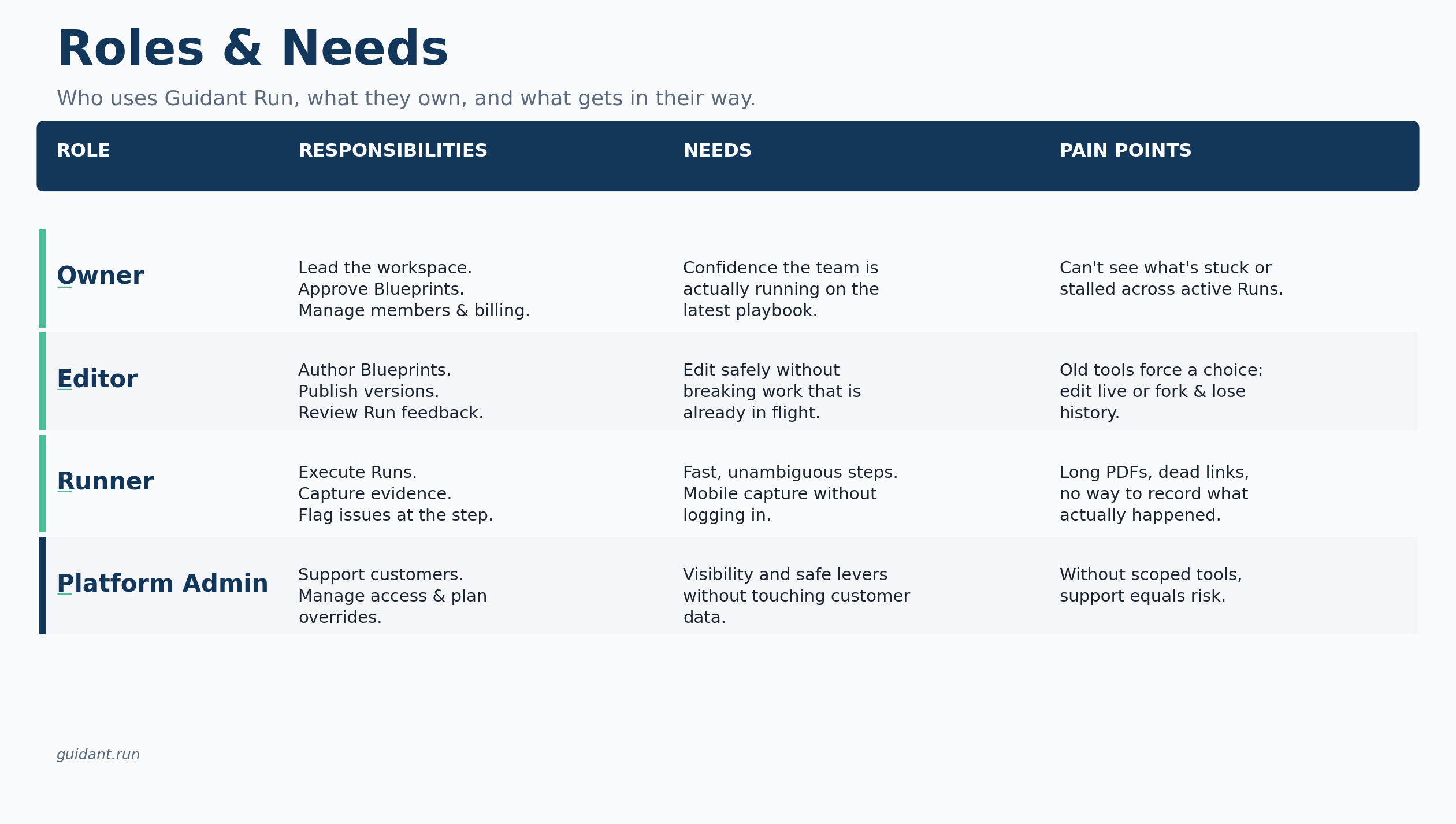
We centered the product around three primary roles mapped directly to in-app permissions, plus an implicit fourth role on our side.
- Owners - Ops leaders, COOs, and founders responsible for consistency, onboarding speed, and visibility. They create and approve Blueprints, manage workspaces, and control security and billing.
- Editors - Team leads and SMEs who author and iterate on Blueprints, publish new versions, and review feedback from live runs.
- Runners - Frontline operators in fulfillment, support, logistics, or onboarding. They don't write process; they execute it. They need fast, unambiguous, mobile-friendly steps with as little friction as possible.
- Platform admins on our side support customers, manage access requests, and tune plan overrides.
As shown in the Roles & Needs matrix below, each role has a distinct surface area, set of needs, and failure mode the product has to design against.
Why the problem was hard
Several constraints made this more than "just another checklist tool":
- Two modes, one product. Authoring (Blueprints) and execution (Runs) have completely different mental models but share the same data. Conflating them is the number-one reason competitors feel confusing - and our first version made the same mistake.
- Safe versioning. Editors needed to improve templates while existing runs were mid-flight. We had to design a publish model where new Blueprint versions didn't break in-progress work.
- Serious multi-tenancy. Workspaces, role-based access, org-level MFA, and soft-deleted users all had to be enforced at the data layer, not just in the UI, because a single privilege-escalation bug is existential.
- Low-friction mobile capture. Runners on a warehouse floor or in a customer's home needed to attach photos without signing into a full session on every device.
- Language that makes sense. Internal terms like SOM, Process, and Work were engineer-speak - users kept asking "what's a SOM?", a clear signal terminology was adding cognitive load.
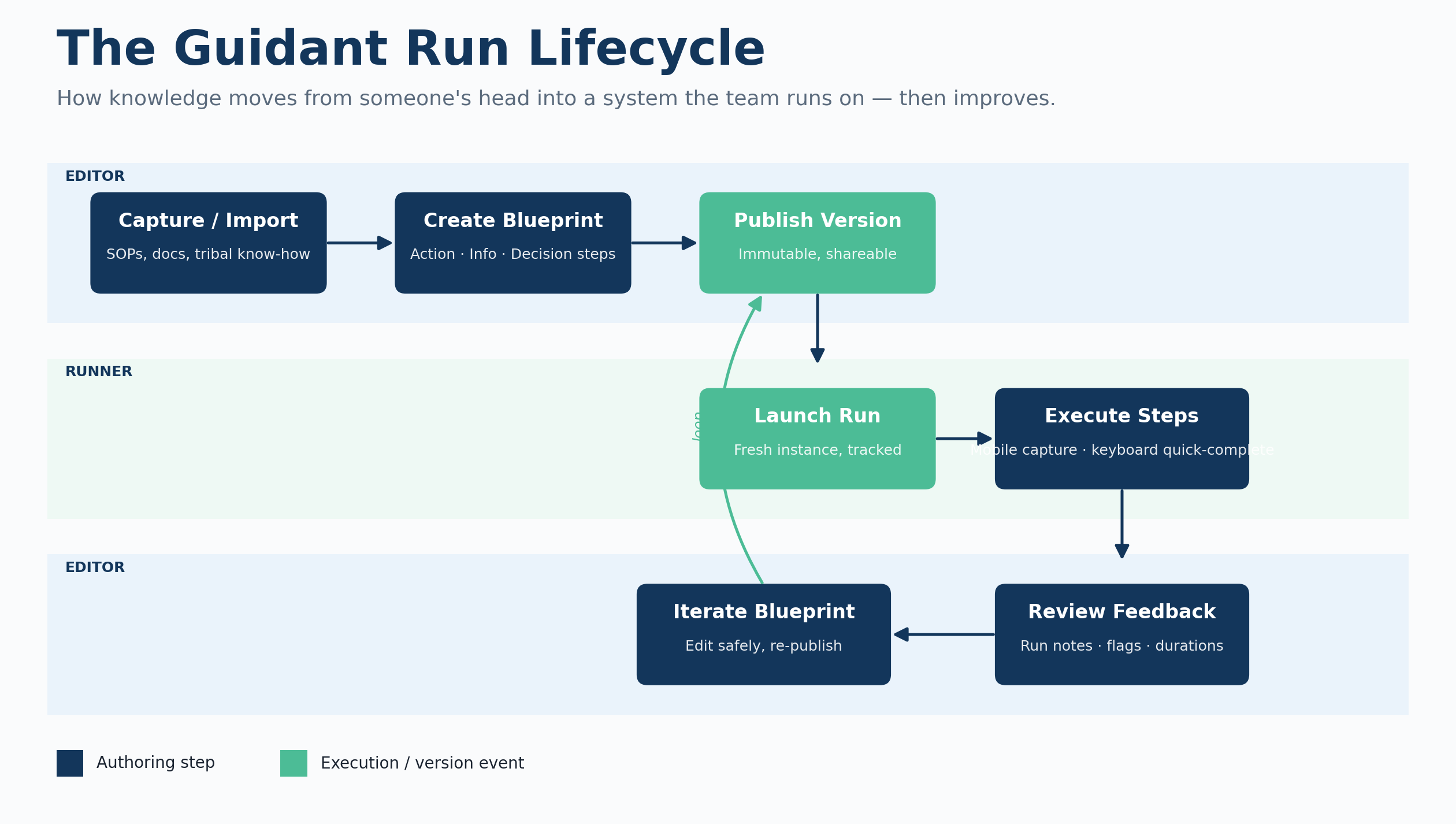
The lifecycle diagram below captures how Editors and Runners share one underlying loop - and why keeping these constraints coherent across both swimlanes was the central design challenge.
Key product decisions
A few deliberate product decisions reset the experience:
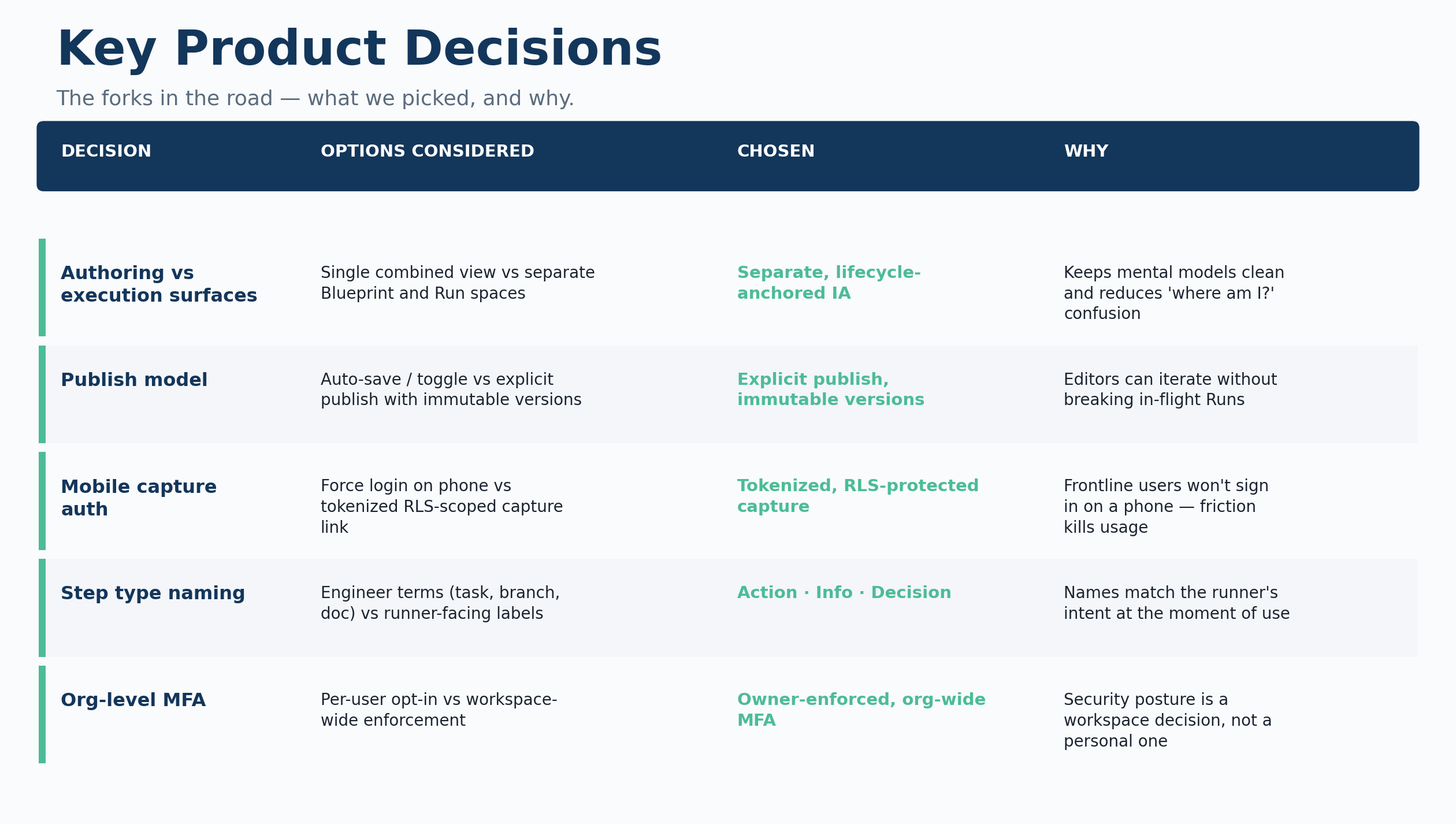
- Lifecycle as the backbone. Rebuilt the IA around a simple loop: Create Blueprint → Publish → Launch Run → Review. Navigation, dashboards, and empty states all teach this lifecycle instead of hiding it.
- One source of truth. Removed an early "Runs Library" surface that duplicated Blueprints. Blueprints became the canonical "how we do it"; Runs are "what's happening right now."
- Explicit publishing. Replaced a casual toggle with a clear publish action and an "Update published version" flow that creates immutable versions without touching in-flight runs.
- Step types named for humans. Manual / System / Branch became Action / Info / Decision. Runners no longer have to decode engineering terminology.
- Inline decisions. Decision steps now expand the relevant instructions in place when a choice is selected, while still logging the decision to the run record.
- Never hard-delete users. Soft-deleting preserves historical attribution and keeps run history intact even when teammates leave.
- Defensive role model. Roles live in a separate table and are checked via secure database functions, with RLS on every tenant-scoped table.
- Opinionated platform choices. Moved to a managed cloud stack and built a first-party billing dashboard on top of Stripe with plan overrides, so we could tune limits for design partners without polluting the catalog.
- Org-first security defaults. Owners can enforce 2FA at the workspace level (email OTP or TOTP), and the sign-in experience respects those org policies rather than treating MFA as an optional personal preference.
The decisions table below makes the tradeoff thinking concrete - the alternatives we considered, what we chose, and why.
Outcome and impact
The redesigned Guidant Run shipped as a coherent lifecycle-driven product rather than a collection of tools.
- Faster activation. Time from new workspace to first published Blueprint dropped significantly as the lifecycle band and teaching empty states guided users through "document → publish → run," and AI-assisted import reduced the blank-canvas problem.
- Less confusion. Support questions like "where do I publish?" and "what's the difference between a Blueprint and a Run?" effectively disappeared after we fixed terminology and the publish flow.
- Safer iteration. Editors ship new versions without fear of breaking live work, and separating Editor Notes from Run Notes keeps template feedback distinct from execution feedback.
- Better operational visibility. Owners see In Progress, Stalled, Completions (7d), and Active Blueprints at a glance instead of a generic project board, giving them a true picture of how operations are running.
- A defensible foundation. With every run tied back to a Blueprint version and capturing step durations, skips, flags, and notes, we now have the data substrate for recommendation intelligence - surfacing which steps stall, which Blueprints drift from reality, and where to improve next.
Founding customers
25
Operator companies onboarded in beta.
Active users
140
85–95 daily active across founding accounts.
SOMs & runs
800 / 1,500+
SOMs authored and guided runs executed; ~350 runs/day.